
Everdisk
Turn your iPhone or iPad into a wireless drive that shares files with any device on your network


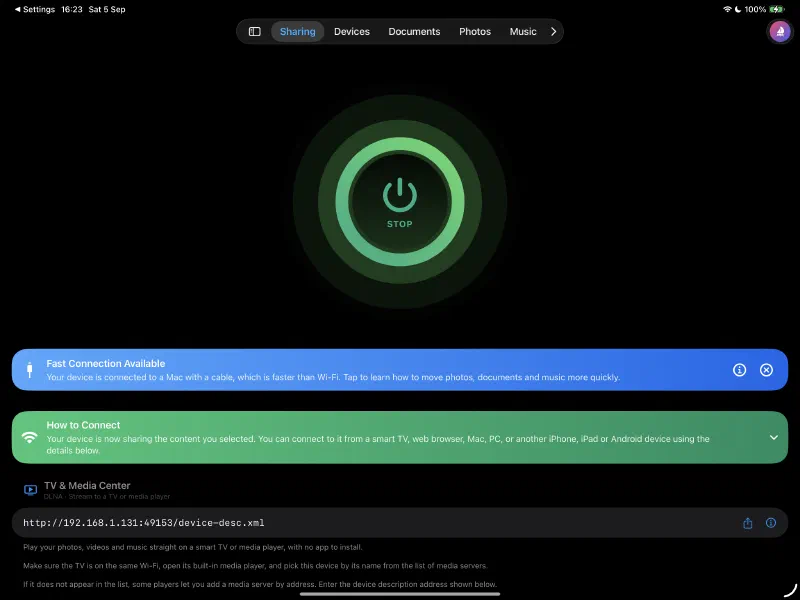
Your Device Becomes a Drive
Tap Start and your iPhone or iPad turns into a wireless drive. Everdisk runs five servers at the same time - DLNA, HTTP, WebDAV, SMB and FTP - so smart TVs, computers, web browsers and file apps each connect the way they like. No accounts, no cloud, and nothing extra to install on the other side.
Watch on Your TV
Stream photos, videos and music straight to smart TVs and media players over DLNA. Your library shows up on the TV by itself, with preview thumbnails, so you can enjoy it on the big screen without any cables or extra apps.
Open in Any Web Browser
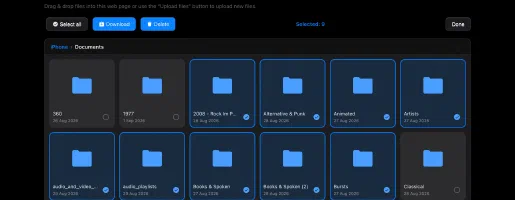
Share a simple link and the other person just opens it in a browser. They can browse your files in a clean grid or list, view photos in a full screen gallery, play music in the built-in player, and download anything - with nothing to install on their end.
Use It as a Network Drive
Connect from Finder on a Mac, from Windows or from Linux over WebDAV, and your device appears like a normal network disk. Drag and drop files in both directions, or mount it over SMB instead, with SMB3 (AES) encryption.
No Wi-Fi? Use the Cable
Connect your device to a Mac with the same USB cable you use to charge it. Files move straight through the cable, faster than Wi-Fi, and it keeps working on a plane, in a hotel, or on any locked network where Wi-Fi is blocked.
Connect to Other Devices
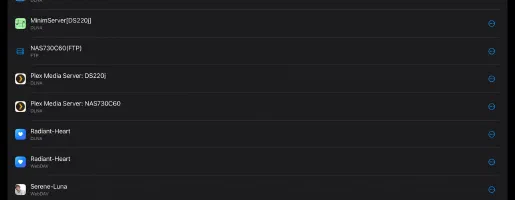
Find and connect to DLNA, WebDAV, FTP, SFTP and SMB servers on your network - Macs, Windows PCs, Linux machines and NAS drives. Browse their folders, stream audio and video, download files, and create folders, upload, rename, move or delete when the server allows it.
Clean & Simple Design

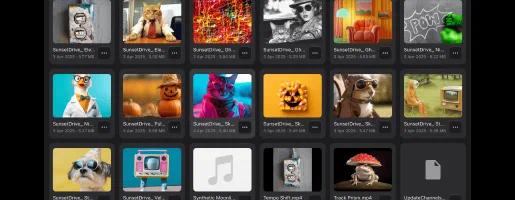

Full Features Set
Pricing Plans
Free
Lifetime Purchase
Pricing: Prices are shown in US dollars for the United States. Final pricing may vary based on your region.
Available Versions

Everdisk
iOS • iPadOS
Platform
iOS 15.5+
Version
1.4
Price
Free
Downloads
1.9K+
Rating
5.0 ★ 1
Age
4+
Updated
19.09.2026
Released
20.08.2026
Category
Utilities
Language
EN + 43 More
Size
51.5 MB
Release Notes
1.4 · 19.09.2026

Everdisk
App details and ratings come from the U.S. App Store. Download counts come from App Store Connect and are updated regularly.
Frequently Asked Questions
What is Everdisk?
Everdisk turns your iPhone or iPad into a wireless drive and a hub that connects to your other devices too.
You can share your files, photos, videos and music with anything on your network, browse and stream from other servers, and manage everything right on your device.
There are no accounts, no cloud, and no extra app to install on the other side - you just tap Start and you are ready.
The app runs five servers at the same time, so every device connects the way it likes: smart TVs over DLNA, computers and web browsers over HTTP, Finder, Windows and Linux over WebDAV, a network drive over SMB (with optional encryption), and file apps over FTP.
How does Everdisk work?
When you tap Start, Everdisk begins sharing the content you selected and runs five servers at once so different devices can connect in the way they prefer.
- DLNA lets smart TVs and media players find your photos, videos and music automatically and show them with preview thumbnails.
- HTTP gives anyone a simple link they can open in a web browser to browse, preview and download your files, with nothing to install.
- WebDAV makes your device appear as a normal network drive in Finder, Windows or Linux so you can drag files in both directions.
- SMB makes your device a network drive on Mac, Windows and Linux - on a Mac it appears on its own in the Finder sidebar - and it is the only connection you can encrypt with SMB3 encryption (AES).
- FTP works with file apps and power users.
Everdisk also connects the other way, to DLNA, WebDAV, FTP, SFTP and SMB servers on your network - including Macs, Windows PCs, Linux machines and NAS drives - so you can browse their folders, stream audio and video, and download or manage files when the server allows it. Everything stays on your local network and never touches the internet.
Is Everdisk free?
Yes. Everdisk is a free download and you can turn your device into a wireless drive, share your files five ways, connect to other servers, and use the built-in file manager at no cost.
There is an optional one-time Premium Lifetime purchase - a single payment with no subscription - that unlocks unlimited shared folders and saved connections, photo & video conversion, SMB3 encryption (AES), custom ports, auto-start sharing, and device customization. It is tied to your Apple ID, so you can use Restore Purchases to unlock it on your other devices. Prices may vary depending on your country or region.
How do I connect from my computer?
Everdisk makes your device appear as a normal network drive over WebDAV.
- On a Mac, open Finder, choose Go → Connect to Server, and enter the WebDAV address shown in the app.
- On Windows, map a network drive using the same WebDAV address.
- On Linux, connect to the WebDAV address from your file manager.
Once connected, you can drag and drop in both directions: copy files from your computer to your device, or pull them back. You can also open the HTTP link in any web browser if you prefer not to mount a drive.
Can I use SMB and encrypt the connection?
Yes. Alongside WebDAV, Everdisk shares over SMB - a network drive for Mac, Windows and Linux (shown in the app as the Computer (Advanced) connection). On a Mac it appears on its own in the Finder sidebar under Locations; on Windows, open it in File Explorer using the smb:// address shown in the app.
SMB is also the only connection you can encrypt. Set a login and password, then turn on Require SMB Encryption in Settings to protect every transfer with SMB3 encryption (AES), so no one else on the same network can read your files. Encrypted connections can’t be anonymous, so a login and password are required, and you need a client that supports SMB3 - the Finder on a modern Mac, or Windows 10 and later.
How do I stream to my TV?
Make sure your TV or media player and your device are on the same Wi-Fi network, then tap Start in Everdisk with your photos, videos or music shared.
Your device will appear by itself in the list of media servers on the TV, complete with preview thumbnails. Open it on the TV and enjoy your library on the big screen - no cables and no extra apps required.
How do I open my files in a web browser?
Tap Start and Everdisk gives you a simple web address for the HTTP server.
Share that link with anyone on the same network. They open it in any web browser to browse your files in a clean grid or list, view photos in a full-screen gallery, play music in the built-in player, and download anything. There is nothing to install on their end, which makes it the quickest way to hand files to another phone or computer.
Does Everdisk work without Wi-Fi?
Yes. Connect your device to a Mac with the same USB cable you use to charge it, and files move straight through the cable, faster than Wi-Fi.
Because it does not depend on a wireless network, this keeps working on a plane, in a hotel, or on any locked or public network where Wi-Fi sharing is blocked.
What can I connect to with Everdisk?
Everdisk is also a client for other devices on your network. You can find and connect to DLNA, WebDAV, FTP, SFTP and SMB servers, including Macs, Windows PCs, Linux machines, NAS devices and media servers.
Once connected, you can browse their folders, stream audio and video, download files, and create folders, upload, rename, move or delete when the server allows it.
Can I scan documents and work with PDFs?
Yes. Everdisk can scan paper documents with your camera - it finds the edges automatically, straightens every page, and saves them as a clean multi-page PDF right on your device.
You can also open a PDF (or photo) and mark it up right in the built-in viewer - draw, highlight, add text and shapes, and add a signature with your finger - and your changes are saved back to the file.
On top of that, Everdisk includes a full set of PDF Tools, opened from a PDF’s ••• menu in the Files browser:
• Compress - shrink a PDF, with an estimated size shown before you save.
• Text Recognition (OCR) - turn a scan into a searchable PDF, or export the text to a .txt file.
• Password - set, change or remove the password needed to open the PDF.
• Permissions - review what the PDF allows (printing, copying, and more).
• Edit Metadata - change or clear the title, author, keywords and other document info.
• Flatten - burn annotations and form entries into the page so they can’t be changed.
Is Everdisk private and safe?
Everything stays on your local network and never touches the internet, so your files never leave home. There are no accounts and no cloud in the middle.
You can protect access with a login and password so connected devices must enter the same details before they can see your files, and you can block any device on your network with a single tap. For the best privacy, turn sharing on only while you are connected to a Wi-Fi network you know and trust.
What can I do with the file manager?
Everdisk includes a full file manager for everything on your device.
You can browse in list or grid, create folders, rename, move, copy, zip and unzip, and delete. You can also connect folders from anywhere on your device and work with them right in the app, then share them over the network alongside everything else.
Can I play music inside the app?
Yes. Tap any audio file and it plays in the mini player that stays at the bottom of the screen while you keep browsing.
The mini player has a full queue with shuffle and repeat (off, all, or one), and lock screen and media-key controls that show the real title, artist and album. Tap or swipe up to open the full player, and swipe down to shrink it while the audio keeps playing. Tapping one track in a folder plays the whole folder as a queue.
Audio plays from your local files, connected folders, your Music library, and servers you connect to on the Devices tab.
Can I watch videos in the app?
Yes. Tap a video to play it full screen. Everdisk uses the built-in system video player, so you get the familiar controls, including AirPlay, Picture in Picture, and playback speed.
Videos play from your local files and connected folders, or stream straight from a device you connect to on the Devices tab, so you do not have to download the whole file first.
How do I view my photos?
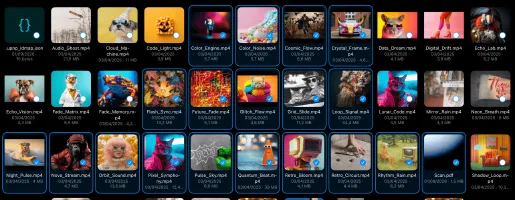
Open the Documents tab and switch to Photos mode to browse your photos and videos. Tap a photo to open it full screen, where you can zoom, swipe between photos, and share.
Your photos also show real preview thumbnails on a TV over DLNA and in a web browser, where they open in a full-screen gallery with swipe, pinch-to-zoom, and a slideshow. Photos and videos that have location data show a map with a pin on their Info screen.
User Guide
This guide will help you get the most out of Everdisk on your iPhone and iPad. Learn how to turn your device into a wireless drive, connect a TV, computer or browser, reach your own servers, manage and play your files, and keep everything private on your local network.