What is the difference between Evermusic and Evermusic Premium
Evermusic and Evermusic Premium are two different versions of the same music player application, with Evermusic Premium offering additional features and benefits compared to the standard Evermusic version.
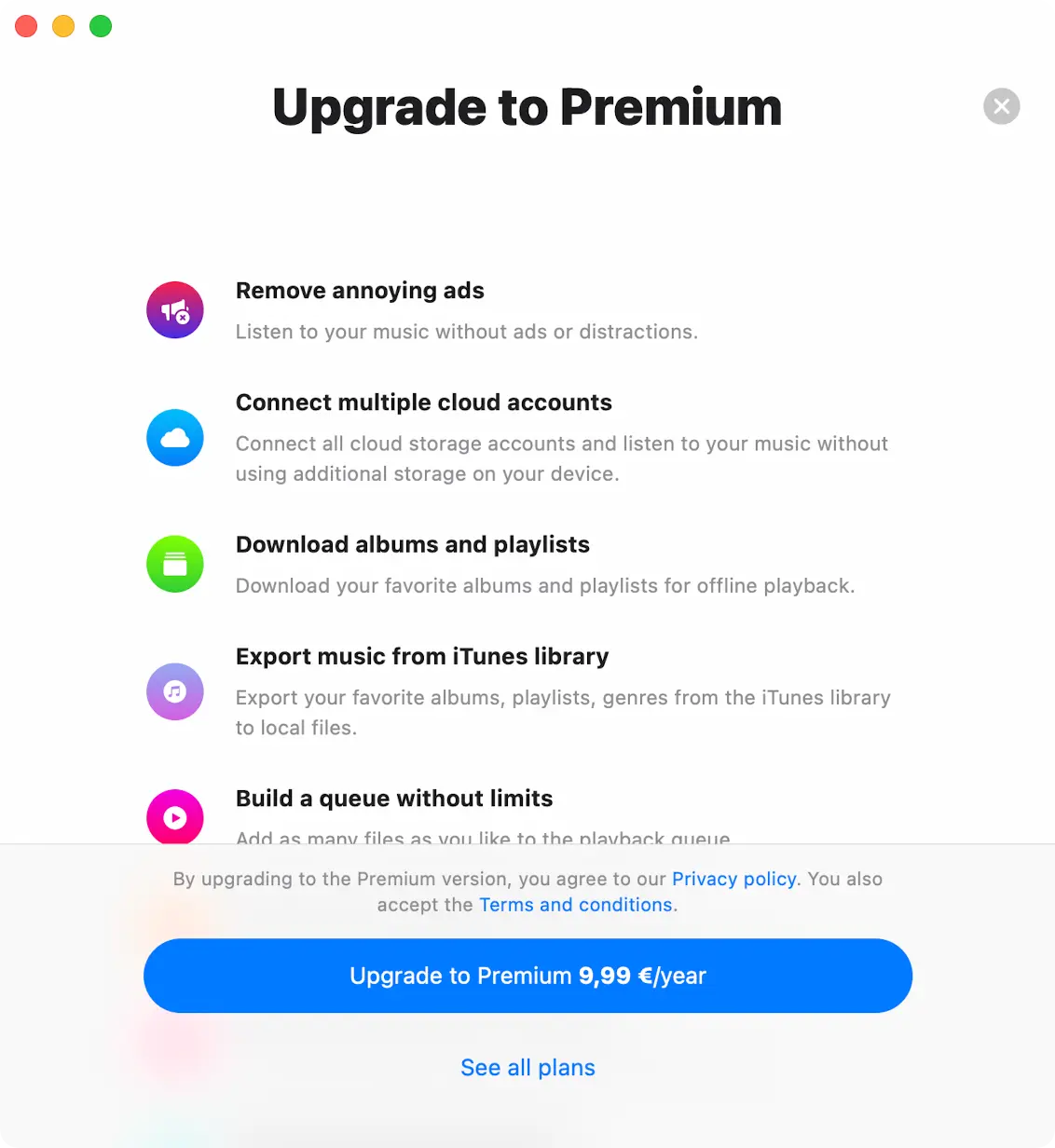
Evermusic Upgrade To Premium
Choose Your Premium Plan
The free version of the application offers a one-time lifetime in-app purchase and two subscription options (1 month and 1 year) to remove all restrictions and upgrade to the Premium version, allowing you to choose the best and most optimal price for you. Prices may vary depending on your country or territory. Also, please keep in mind that Family Sharing is enabled for all purchases and plans, so you can share the Premium version with members of your family.
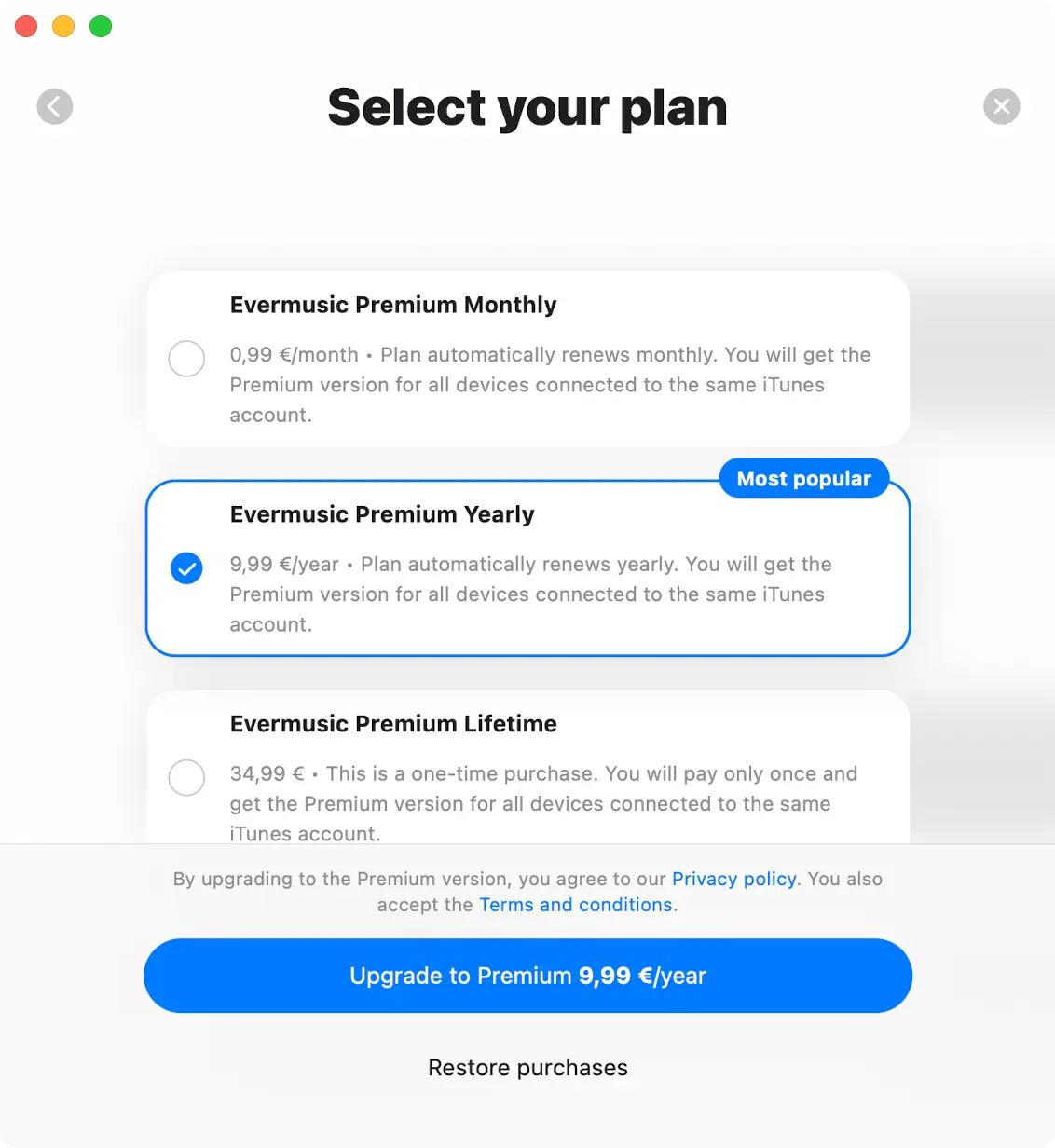
Evermusic Premium Select Your Plan
Sharing Purchases Between iOS and Mac
Lifetime purchases and subscriptions are shared between iOS and Mac, using iCloud to sync this information. If you have the Premium version on your iOS device, please ensure you have the latest version installed and that iCloud is enabled. Start the app on iOS and wait one minute for your purchase information to upload to iCloud.
You can also try pressing the “Restore Purchases” button in the app Settings. Afterward, install the latest app version from the App Store on your Mac and start the app. Ensure you have an internet connection and are using the same iCloud and App Store account on your Mac that you used on your iOS device. Wait one minute for the app to download purchase info from iCloud. The Premium version should activate on your Mac automatically.
Restore Purchases
To restore your purchase on the new device just use the “Restore purchases” menu. You will see the list of your purchases. If you don’t see all your purchases please check if the device is connected to the same iTunes account that was used to make purchases, and make sure iCloud is enabled.

Evermusic Premium Purchase Restore
Once you upgrade your app, you will see the Premium status screen with details of your current purchases.
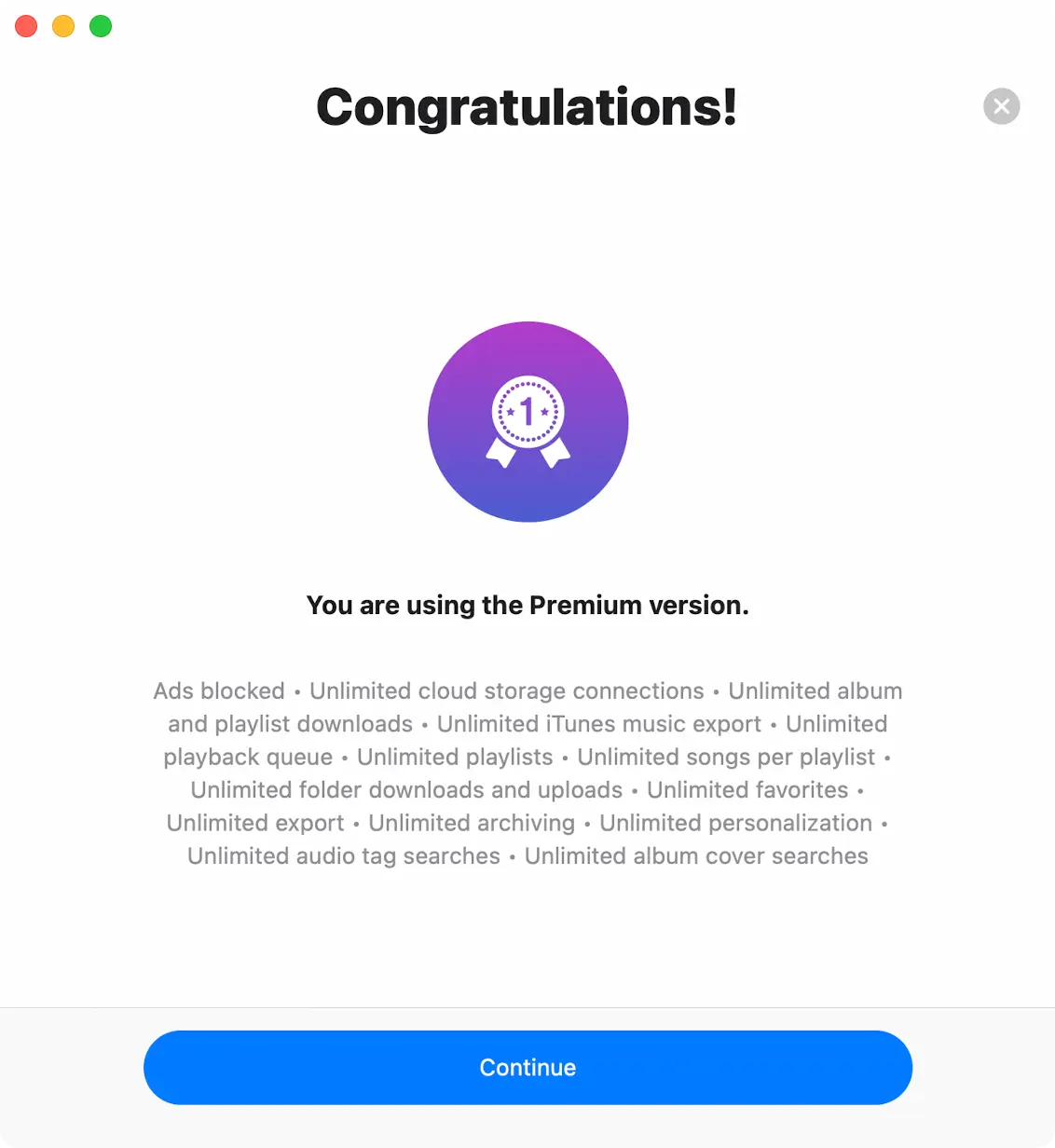
Evermusic You Are Using Premium
Evermusic Pro (Red Icon) vs Evermusic Free (Blue Icon)
Evermusic Pro, the app with the red icon, has exactly the same functionality as Evermusic Free (blue icon) with an activated Premium in-app purchase. Both apps share the same features, and the same look and feel. So if you have already upgraded the blue Evermusic Free to Premium, there is no need to install the red Evermusic Pro, you already have everything Pro offers.
What differs between blue and red is how they’re packaged on the App Store, which platforms each one runs on, and a couple of defaults.
Download on the App Store

Evermusic



Evermusic Pro

Evermusic


App Store packaging
- Evermusic Free (blue) is published as two separate App Store apps with separate bundle IDs — one for iOS / iPadOS and a dedicated one for macOS. The Mac version is Universal, so it runs on both Apple Silicon Macs (M1, M2, M3, M4, M5 and later) and Intel Macs. Purchases made in one of the blue apps are shared with the other via iCloud — for example, a Premium subscription bought in Evermusic Free on iPhone automatically unlocks Premium in Evermusic Free on Mac (and vice versa), as long as both devices are signed in to the same Apple ID and have iCloud enabled.
- Evermusic Pro (red) is a single App Store app with a single bundle ID that runs on iPhone, iPad, and Apple Silicon Macs (M1 and later). Because there’s only one bundle, there’s nothing to sync — one purchase covers every device you install it on. Evermusic Pro does not support Intel Macs.
Key differences
- Mac compatibility. The blue Evermusic Free Mac app is Universal and supports both Apple Silicon and Intel Macs. The red Evermusic Pro is Apple Silicon-only (M1 and later) — it cannot be installed on Intel Macs. If you (or anyone in your Family Sharing group) still uses an Intel Mac, choose the blue Evermusic Free + Premium so Mac support is covered.
- Price. Because Evermusic Pro (red) skips the Intel Mac build, its App Store price is slightly lower than the equivalent Premium in-app purchase in the blue app.
- Privacy / analytics. Evermusic Pro (red) does not collect any user diagnostics or analytics at all — analytics are completely disabled in the build, with no opt-in option. The blue Evermusic Free uses standard analytics defaults, which you can turn off at any time under Settings → Analytics and Data Collection.
- Cross-app purchase. Bundle IDs differ between blue and red, so a Premium purchase activated in the blue app does not unlock the red app for free, and vice versa. Purchase sync works within the same color — blue iOS ↔ blue Mac via iCloud, or red across all of its supported devices automatically.
Which one should I choose?
- Use Evermusic Free (blue) + Premium if you want the widest device coverage — iPhone, iPad, Apple Silicon Mac, and Intel Mac — with one Premium purchase covering both the iOS and Mac blue apps via iCloud purchase sync.
- Use Evermusic Pro (red) if you only use iPhone, iPad, and an Apple Silicon Mac (M1 or later), you prefer the lower upfront price, and you want a build with no analytics or diagnostics collected at all — out of the box and with no opt-in option.
Evermusic Free
- Contains Ads: The free version displays ads to generate revenue, which can occasionally disrupt your music listening.
- Limited Playlists: You can create up to 10 playlists in the free version.
- Restricted Cloud Services: The free version supports up to 3 cloud services. – Limited Archiving: In the free version, you can archive (ZIP) up to 3 media collections (playlist, album, artist, or genre).
- Limited Favorites: You can add a maximum of 100 songs to your favorites in the free version.
- Playlist and Queue Limits: The free version has limits on the number of songs you can add to a single playlist (1,000) and the maximum number of songs in the player queue (750).
- Limited Offline Features: The free version has restrictions on offline access, including only 1 offline folder and the ability to download albums, artists, genres, playlists, and composers offline.
- No iTunes Music Collections Export: You cannot export collections from iTunes music to Local Files in the free version.
- Limited Tags Searching Features: Offers 20 automatic tags search requests and 20 album art search requests per day.
- Limited Media Collections Export: Allows 5 media collections (playlists, albums, artists, genres) exports to M3U/CSV/TXT per day.
- Limited Personalization Features: You can use only limited personalization options, and changing the app icon is also restricted.
Evermusic Premium
- Ad-free experience: Evermusic Premium eliminates ads, providing a seamless and uninterrupted music listening experience.
- Unlimited playlists: You can create an unlimited number of playlists with Evermusic Premium.
- Unlimited cloud services: Evermusic Premium allows you to connect to an unlimited number of cloud services, expanding your music library access.
- Unlimited Archiving: Premium lets you archive (ZIP) unlimited media collections, including playlists, albums, artists, and genres.
- Unlimited favorites: You can add an unlimited number of songs to your favorites in Evermusic Premium.
- Playlist and queue flexibility: Evermusic Premium removes limitations on playlist and queue size, giving you more control over your music organization.
- Extensive offline features: Evermusic Premium offers advanced offline capabilities, including the ability to download folders, albums, artists, genres, playlists, and composers offline.
- iTunes music collections export: You can export collections from iTunes music to Local Files.
- Unlimited Tags Search: Offers unlimited automatic tags search requests.
- Unlimited Album Art Search: Offers unlimited album art search requests.
- Unlimited Media Collections Export: Allows unlimited media collections (playlists, albums, artists, genres) exports to M3U/CSV/TXT.
- Full Personalization: Provides full personalization options, including the ability to change the app icon.
| Feature Description | Evermusic Free | Evermusic Premium |
|---|---|---|
| Ad-free music experience | No | Yes |
| Total playlists you can create | 10 | Unlimited |
| Number of cloud storage services you can connect | 3 | Unlimited |
| Archive playlists, albums, artists, or genres to ZIP format | 3 | Unlimited |
| Songs you can mark as favorites | 100 | Unlimited |
| Songs allowed in a single playlist | 1000 | Unlimited |
| Songs allowed in the playback queue | 750 | Unlimited |
| Download individual files from cloud storage | Yes | Yes |
| Download and upload entire folders | No | Yes |
| Download entire albums, artists, and genres | No | Yes |
| Number of folders you can make available offline | 1 | Unlimited |
| Albums, artists, genres, playlists, composers available offline | 1 | Unlimited |
| Export individual songs from iTunes / Apple Music | Yes | Yes |
| Export full collections from iTunes / Apple Music | No | Yes |
| Daily automatic audio tag and album-art searches | 20 | Unlimited |
| Export playlists, albums, artists, and genres to M3U / CSV / TXT | 5 | Unlimited |
| Full personalization (including custom app icon) | No | Yes |
What to choose?
In summary, you have three paths to a full-featured Evermusic experience:
- Evermusic Free (blue icon) — start here for free with limits; upgrade to Premium later via in-app purchase if you decide you want unlimited cloud services, playlists, offline content, and an ad-free experience.
- Evermusic Free + Premium (blue icon) — the widest device coverage: iPhone, iPad, Apple Silicon and Intel Mac, all from a single purchase, with Family Sharing for up to five additional family members.
- Evermusic Pro (red icon) — a slightly cheaper, Apple Silicon Mac-only alternative with analytics and diagnostics off by default. Best if you only use iPhone, iPad, and an M1 / M2 / M3 / M4 / M5 (or later) Mac, and you want maximum privacy out of the box.
The free version is great for casual listeners, while Premium and Pro are aimed at users who want the full feature set, an ad-free experience, and unlimited offline access to their music library. The choice ultimately depends on your devices, privacy preferences, and music-listening habits.