iOS Audio Streaming with AVAssetResourceLoader

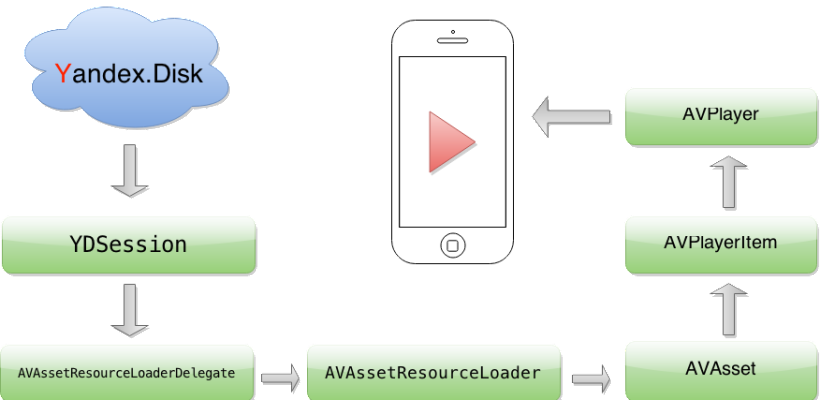
TL;DR: Use AVAssetResourceLoaderDelegate with a custom URL scheme to intercept AVPlayer’s resource loading. This lets you add custom authorization headers for cloud services, cache audio to disk, and control streaming behavior – all without writing a local HTTP proxy. Full source code is on GitHub.
Why AVPlayer Needs a Custom Resource Loader
AVPlayer plays audio from local files and remote URLs. For most cloud services (Dropbox, Google Drive, Box), you can pass a direct download URL and playback works out of the box.
However, some services like Yandex.Disk and WebDAV require custom authorization headers on GET requests. AVPlayer provides no built-in way to inject these headers.
The solution: use the resourceLoader property of AVURLAsset. This API intercepts resource loading requests, acting like a local HTTP proxy without the complexity.
How It Works
AVPlayer uses resourceLoader when it does not recognize the URL scheme. By replacing https:// with a custom scheme (e.g., customscheme://), you force AVPlayer to delegate all loading to your app.
You need to implement two AVAssetResourceLoaderDelegate methods:
resourceLoader:shouldWaitForLoadingOfRequestedResource:– called when AVPlayer needs data. Save theAVAssetResourceLoadingRequestand start your data loading operation.resourceLoader:didCancelLoadingRequest:– called when a request is canceled or superseded.
How to Create a Custom AVPlayer
Set up an AVPlayer with a custom URL scheme:
NSURL *url = [NSURL URLWithString:@"customscheme://host/audio.mp3"];
AVURLAsset *asset = [AVURLAsset URLAssetWithURL:url options:nil];
[asset.resourceLoader setDelegate:self queue:dispatch_get_main_queue()];
AVPlayerItem *item = [AVPlayerItem playerItemWithAsset:asset];
[self addObserversForPlayerItem:item];
self.player = [AVPlayer playerWithPlayerItem:item];
[self addObserversForPlayer];
This code:
- Defines a URL with your custom scheme
- Creates an
AVURLAssetwith a delegate on the main queue - Builds an
AVPlayerItemfrom the asset - Initializes
AVPlayer
Implementing the Resource Loader Delegate
Create a class called LSFilePlayerResourceLoader to handle data fetching from the server and pass it back to AVURLAsset. Store loader instances in a dictionary keyed by resource URL.
- (BOOL)resourceLoader:(AVAssetResourceLoader *)resourceLoader shouldWaitForLoadingOfRequestedResource:(AVAssetResourceLoadingRequest *)loadingRequest {
    NSURL *resourceURL = [loadingRequest.request URL];
    if ([resourceURL.scheme isEqualToString:@"customscheme"]) {
        LSFilePlayerResourceLoader *loader =
        [self resourceLoaderForRequest:loadingRequest];
        if (!loader) {
            loader = [[LSFilePlayerResourceLoader alloc] initWithResourceURL:resourceURL session:self.session];
            loader.delegate = self;
            [self.resourceLoaders setObject:loader forKey:[self keyForResourceLoaderWithURL:resourceURL]];
        }
        [loader addRequest:loadingRequest];
        return YES;
    }
    return NO;
}

- (void)resourceLoader:(AVAssetResourceLoader *)resourceLoader didCancelLoadingRequest:(AVAssetResourceLoadingRequest *)loadingRequest {
    LSFilePlayerResourceLoader *loader = [self resourceLoaderForRequest:loadingRequest];
    [loader removeRequest:loadingRequest];
}
These methods check the URL scheme, create or retrieve a loader, and add the request to the loader’s queue. Unrecognized schemes return NO.
LSFilePlayerResourceLoader Interface
@interface LSFilePlayerResourceLoader : NSObject

@property (nonatomic, readonly, strong) NSURL *resourceURL;
@property (nonatomic, readonly) NSArray *requests;
@property (nonatomic, readonly, strong) YDSession *session;
@property (nonatomic, readonly, assign) BOOL isCancelled;
@property (nonatomic, weak) id<LSFilePlayerResourceLoaderDelegate> delegate;

- (instancetype)initWithResourceURL:(NSURL *)url session:(YDSession *)session;
- (void)addRequest:(AVAssetResourceLoadingRequest *)loadingRequest;
- (void)removeRequest:(AVAssetResourceLoadingRequest *)loadingRequest;
- (void)cancel;

@end

@protocol LSFilePlayerResourceLoaderDelegate <NSObject>

@optional
- (void)filePlayerResourceLoader:(LSFilePlayerResourceLoader *)resourceLoader didFailWithError:(NSError *)error;
- (void)filePlayerResourceLoader:(LSFilePlayerResourceLoader *)resourceLoader didLoadResource:(NSURL *)resourceURL;

@end
Data Loading: Two-Step Process
When a loading request enters the queue, two operations execute in sequence:
- contentInfoOperation – queries content length, MIME type, and byte-range support
- dataOperation – fetches file data starting from the
requestedOffset
Disk Caching Strategy
Downloaded data is written to a temporary file on disk. Subsequent requests for the same content are served from this cache, avoiding redundant network calls. This approach:
- Reduces bandwidth usage
- Enables near-instant replays
- Supports seek operations within cached ranges
Processing Pending Requests
The processPendingRequests method fills each request’s contentInformationRequest with metadata and delivers cached byte ranges. Completed requests are removed from the queue.
Source Code and Next Steps
This tutorial provides a high-level overview of implementing AVAssetResourceLoaderDelegate for cloud audio streaming with custom authorization headers. The full source code is available on GitHub.
This approach powers the audio streaming engine in Evermusic, which streams music from Dropbox, Google Drive, OneDrive, Yandex.Disk, and other cloud services on iOS and macOS.
Frequently Asked Questions
When should I use AVAssetResourceLoaderDelegate instead of a direct URL?
Does this approach work with Swift?
AVAssetResourceLoaderDelegate protocol works the same way in Swift. The Objective-C examples here translate directly.
Can I use this for video streaming too?
AVAssetResourceLoaderDelegate works with any media type that AVPlayer supports, including video. The same custom-scheme approach applies.
Does this support background audio playback?
AVAudioSession correctly.