App Store Keyword Optimization: Free ASO Tool

Why App Store Keywords Determine Your Download Numbers
TL;DR: Every character in your App Store title, subtitle, and keyword field affects search ranking. This guide covers the rules for optimizing each field and introduces AppKeywords.pro — a free, private, browser-based tool that validates metadata, detects duplicates, and exports JSON for Fastlane workflows.
Optimized metadata leads to:
- Higher search visibility
- More organic downloads
- Broader reach across locales
- Better ranking without paid ads
Managing this manually across multiple languages is tedious and error-prone. The App Store Keyword Optimization Tool solves that.
What Is AppKeywords.pro?
AppKeywords.pro is a free, lightweight ASO tool that runs entirely in your browser. No signup, no tracking, no server-side processing.
Key Features
- 100% local — no login, no data collection, everything stays in your browser
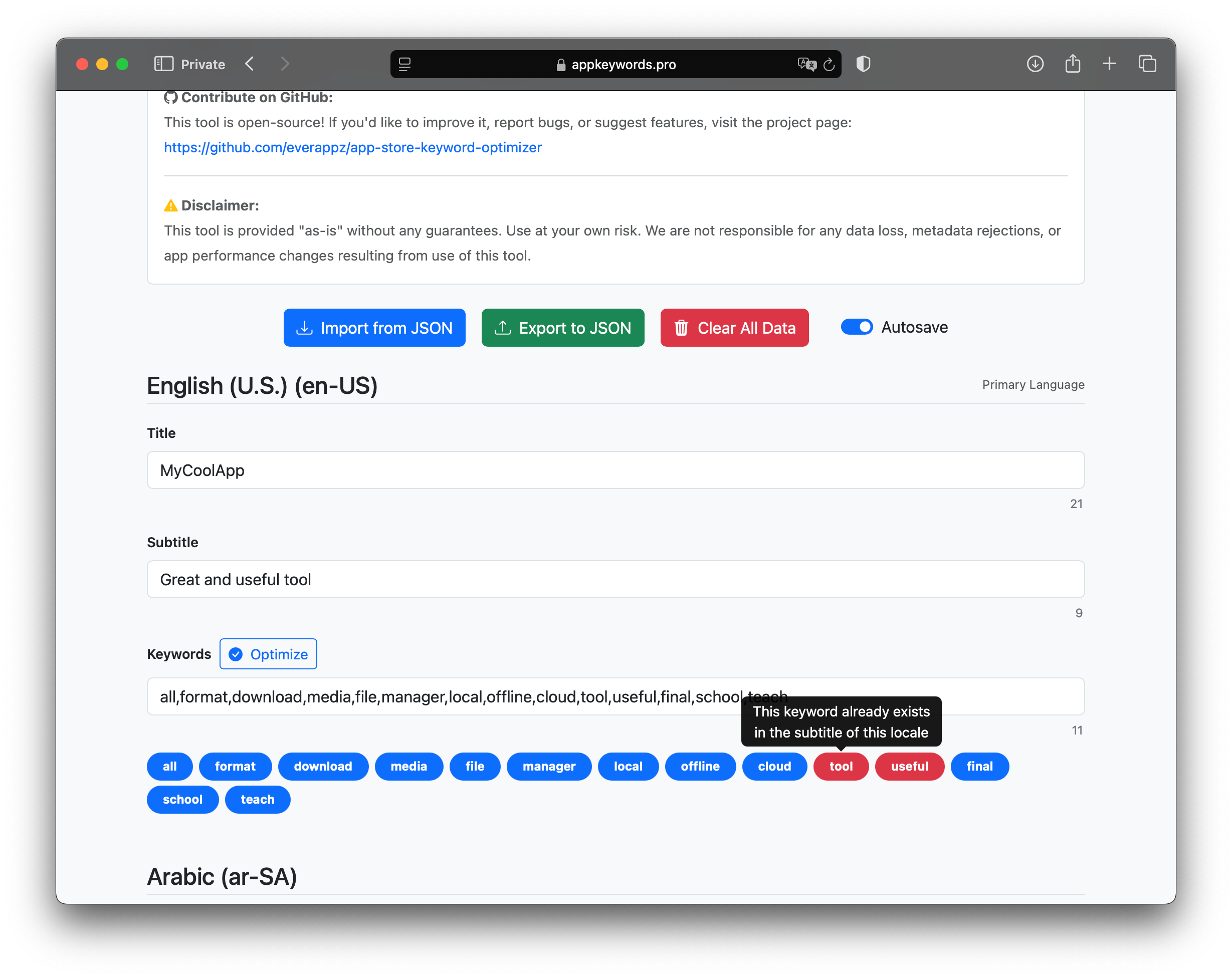
- Real-time character counts for title (30 chars), subtitle (30 chars), and keywords (100 chars)
- One-click optimization — normalizes commas, trims whitespace, removes duplicates
- Visual keyword bubbles — blue for unique keywords, red for duplicates
- Autosave via localStorage — close the tab and resume later
- JSON import/export for Fastlane CI/CD integration
How to Optimize Your App Store Metadata (Step by Step)
1. Enter Your Title, Subtitle, and Keywords
Each locale has three fields with Apple’s character limits enforced in real time:
- Title — 30 characters max
- Subtitle — 30 characters max
- Keywords — 100 characters max
2. Run the Optimizer
Click Optimize to automatically:
- Replace spaces with commas
- Normalize international comma characters
- Trim excess commas and whitespace
- Detect keywords already present in your title or subtitle
- Display keyword bubbles (click any bubble to remove it)
3. Trust the Autosave
All changes persist in your browser’s localStorage. No account needed, no data sent to any server. Close and reopen the tab — your work is still there.
4. Import and Export JSON
- Import a previously saved
.jsonfile to continue editing - Export your metadata for backup or CI/CD pipelines
5. Integrate with Fastlane
The tool’s GitHub repo includes two Bash scripts:
meta_to_json_dict.sh       # Converts Fastlane metadata into JSON
json_dict_to_meta.sh       # Converts JSON back into Fastlane folders
These scripts let you round-trip metadata between Fastlane’s folder structure and the optimization tool during app deployment.
ASO Best Practices for Higher Rankings
- Use intent-based keywords — avoid generic words like “app” or “mobile”
- Never duplicate keywords across title, subtitle, and keyword field (Apple ignores duplicates)
- Fill all 100 characters in the keywords field
- Localize metadata for every major market you target
- Refresh keywords quarterly based on search analytics and seasonal trends
- Separate keywords with commas, no spaces to maximize character usage
Get Started
App Store Optimization does not require expensive tools. With smart planning and AppKeywords.pro, you can improve your app’s visibility and organic downloads in minutes.
Try it now — your next user is one search away.
Contribute to the Project
The tool is open source. Bug reports, feature suggestions, and pull requests are welcome.